In order of when they are shown in the b09 slides
LS
pwd and cd
ls
ls -l prints more information
ls -a prints dot files (i.e. it includes file starting with .)
cat
- Usually used to dump files
- One file by itself doesn’t really concatenate anything… lol
- But with many files it prints everything from them depending on their contents
cat file1 file2 file3
less
lets you view a file (and you can scroll and things too wow!)
mkdir
lets you make a directory w/ the given parent path and the final directory name
mkdir ../newFolder
- This creates a folder in the same directory as the directory your program is in.
- So mkdir understands that given your path and name, itll go to said path and create this new folder
mkdir ./a/b/c/ddoes NOT work because the directory does not exist. (there is no a, b, or c to createdin)
- So mkdir understands that given your path and name, itll go to said path and create this new folder
cp (copy)
cp myfile newname
Or
cp file1 file2 newDirName
To copy a directory (and its contents) you want to do it recursively with -R
mv (move)
Moves files to another directory
mv myFile.txt ./myDirectory ./newDirectory
Also used to rename:
mv myFile.txt nuclearWeaponCodes.txt
- You cannot rename more than 1 file at a time. Any more than 2 arguments implies you’re just tryna move files to another directory
rm and rmdir
rmdirremoves a directory, but they gotta be empty before you can delete them- rm just deletes a files
- You can recursively delete with
rm -rand that will delete everything within a directory
- You can recursively delete with
Week 2-3
echo
”The print command” Takes a string and prints it out. if passed a variable or other expandable things, it will do expansion first before printing it out
By default, adds a new line to the very end of what you’ve echod. More than 1 spaces between arguments are ignored
- You can keep spaces with
\. Stack em with\ \ \ \to get lots of spaces.
sh
Runs the script right after as a shell script (creates a shell instance)
Different from the . dot command
shift
Shifts the “positional parameters” (the “arguments” as I say)
tr does lots of string manipulation (“replace”)
echo bazinga | tr a b ⇒bbzingb
echo icecream sandwich | tr --delete i ⇒ cecream sandwch
[ (test commands)
seq start end
returns a sequence form start to end
i.e. seq 0 3 returns 0\n 1\n 2\n 3 line by line!
getopts
p = (*vector) calloc(sizeof(vector));
if (p == NULL)
{
	printf("Problems have occured!");
	return 1;
}

p->dim = d;
p->a = (double*) calloc(sizeof(double) * d);
// cuz we did calloc everything should be 0
if (p->a == NULL)
{
	free(p); // I woulda NEVER caught this!
	printf("Problems have occured!");
	return 1;
}

return p;
if (head == NULL)
{
// wait... nothing to free. LOL
}
listnode *at = head;
listnode *temp = NULL;
while (at != NULL)
{
temp = at->next;
free(at->a);
free(at);
at = temp;
}Week 4 ? Maybe 3 idek
diff
Compares two files (i.e. EXACTLY 2 inputs). Says what is different. If different, exits 1. If same, exists 0.
-q for briefer output, and -r to find new changes
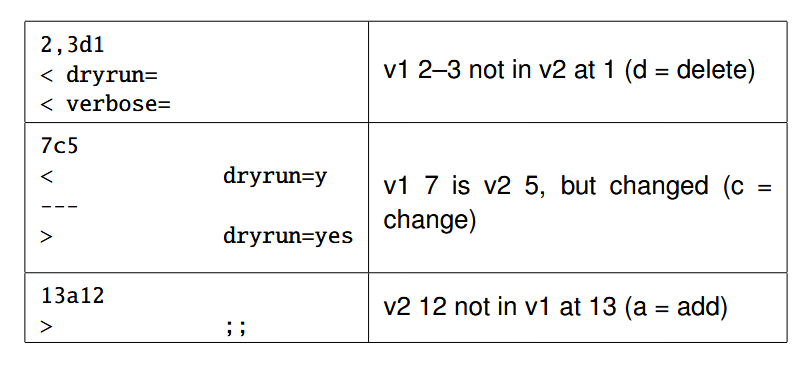
- d = delete lines 2 and 3 cuz
- 7c5 = v1’s line 7 is v2’s line 5 but changed
grep
- Uses regex
- Returns every line where a pattern exists `{echo baca ; echo bazinga ; echo baca bazinga ; } | grep baca
- Outputs
bacaandbaca bazinga(NOTbazinga!)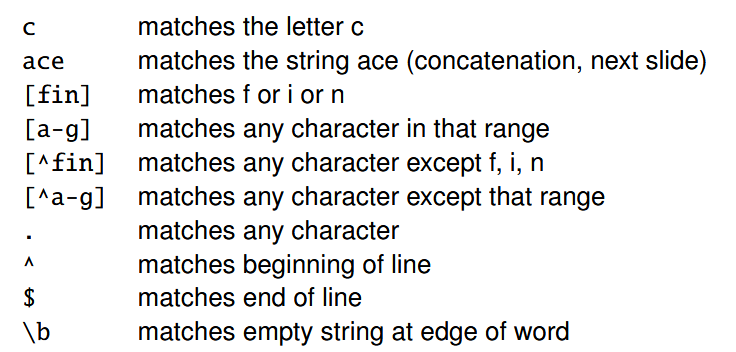
{ echo '2xyz@)' ; echo '9abc@p' ; echo 0aaa@k ; echo aaaa@k ; } | grep '[0-9][a-z][a-z][a-z]@[^)]';
> 9abc@p
> 0aaa@k- A very robust example: First char is num. char’s 2 to 4 are numbers. Must be @. And then anything but
)at the end. Anything longer / shorter would not work!
sort
sort -k "2,2n" to_sort.txt- The
-kflag sorts the second column. Thenspecifies the second column are numbers (sorting between 101 and 78 as strings, 101 would be “smaller” since its first character is less than 7 is )
find
- Finds a file with a bunch of given directories
find mydir ’!’ ’(’ -mmin +3 -mmin -6 ’)’
- Finds files NOT between 3 to 6 minutes ago
Other useful ones
tee: Used to output to more 2+ files
- Takes a file. Reads from stdin. Whatever is inputted from stdin is outputted to the given file and it is thrown into stdout for another command to pipe from
ls -l | tee out.txt | cat- Outputs to
out.txtandcat
- Outputs to
wc: Gives character, word, and line count
--lines only gives # of lines. Same with -c for characters and -w for words. Also -c counts new lines per line so account for those: echo bazinga | wc -c would be 8