All variables are of type String, but can be coerced into integers if the example permits it. for instance “12131” looks like a number so it can be used in
[ 1212 -eq 414 ]for instance
The shell sees things weirdly
Expansion
echo this is a test will output this is a test as you’d expect. However echo * will NOT do that. Instead it prints every file where you are spaced out

This is because the * gets expanded out into something else:
- When “enter” is pressed, any qualifying character in the command line before the command is run is expanded.
echoNEVER saw*, only its expanded result
- Again, but you’ll see even with surrounding words the same problem arises
Wildcards work via pathname expansion
echo D*would expandD*to every file starting withDseparated by spacesecho [[:upper:]]*is also a pathname expansion!echo /usr/*/sharetoo!
Quirks:
echo .*WILL print every file starting with., however THAT ALSO PRINTS.and..(the names that refer to the current working directory and parent directory)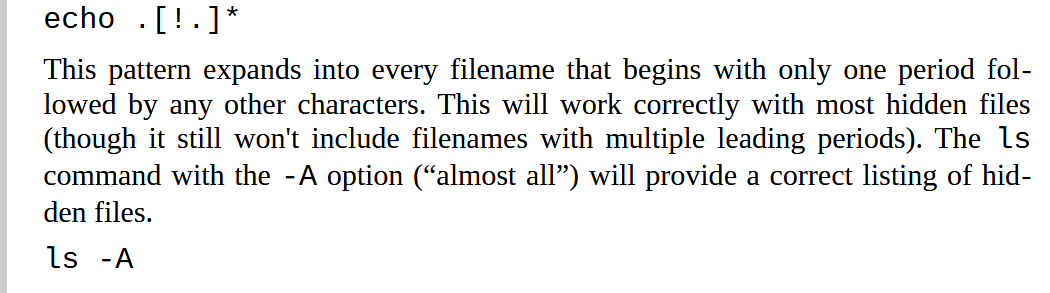
- This would be how you list out dotfiles (files that start with
.) since usually they are NOT printed / hidden away.
- This would be how you list out dotfiles (files that start with
Tilde Expansion
echo ~kidoturns into/home/bob
Brace Expansion
echo Front-{A,B,C}-Bank
- Front-A-Back Front-B-Back Front-C-Back is what would be printed
- Also works with ranges:
echo {1..6}would print1 2 3 4 5 6 - And you can nest them:
echo {Happy {Camper, Customer}, Red {Rose, Sea}}- this would print
Happy Camper Happy Customer Red Rose Red Seatodo confirm
- this would print
acc good stufftodo move outta here
Variables
echo $SUER
- variable no exist = return empty string
Command substitution
echo $(ls)
Quoting
Running echo this is a test, we get this is a test do to word-splitting (the shell removes extra whitespaces from echo’s arguments)
Also running echo You pay $100 would return You Pay 00 since $1 is created like a undefined variable = empty string
Double quotes
- Nullifies the meaning of all but
$,\, and` - I like to think of it as “grouping” a bunch of characters into one concrete “string” This lets us print extra spaces n things.
!! AN IMPORTANT EXAMPLE
echo $(df -h)vsecho "(df -h)The first one looks like this:
Filesystem Size Used Avail Use% Mounted on tmpfs 1.6G 2.0M 1.6G 1% /run /dev/sda2 94G 19G 71G 21% / tmpfs 7.8G 0 7.8G 0% /dev/shm tmpfs 5.0M 4.0K 5.0M 1% /run/lock /dev/sda1 975M 6.1M 969M 1% /boot/efi /dev/sdb1 907G 574G 287G 67% /home tmpfs 1.6G 1.8M 1.6G 1% /run/user/1000
and the other looks like this:
Filesystem Size Used Avail Use% Mounted on tmpfs 1.6G 2.0M 1.6G 1% /run /dev/sda2 94G 19G 71G 21% / tmpfs 7.8G 0 7.8G 0% /dev/shm tmpfs 5.0M 4.0K 5.0M 1% /run/lock /dev/sda1 975M 6.1M 969M 1% /boot/efi /dev/sdb1 907G 574G 287G 67% /home tmpfs 1.6G 1.8M 1.6G 1% /run/user/1000
all organized! Why might that be, though?
Well running just
df -hwill return a list of things taking space with each line separated by new lines. So$(df -h)returns a bunch of lines separated by delimiters. You remember what doesn’t like delimiters? White-splitting! So beforeechois run, the arguments are stripped of their delimiters and printed as a blob.Using "" will preserve the delimiters, thereby printing out the result nicely!
Single Quotes
Suppresses everything inside of it. String literals if you will
Escaping Characters
echo "I have \$5.00" will NOT treat $ as the operator to fetch variables and will instead treat it as a literal $
Also applicable to !, &, , and other characters that have special meaning to the shell.
Also this with \ backslashes

The -e flag for echo
echo -e "It is about time that you...\nfaced the concequences of your actions"
- Allows for control codes
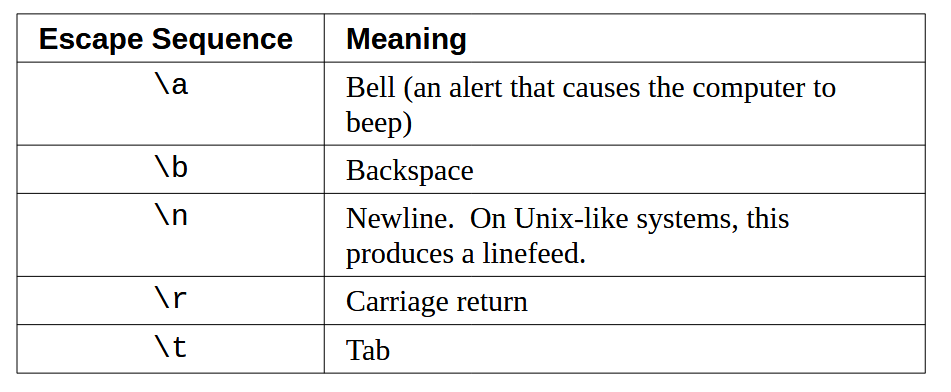
Oh also '\a' does an equivalent thing.