Special characters: \ < * $ # ( & | ; ' " space \n and MANY MORE
These guys will retain their meaning when either escaped with \ or with '' quotes!
Remember [ "$v" < "$w" ] doesn’t work since < is for redirection. Surround with quotes '<'
To check if a string is empty, do NOT do [ -n $v ] because if $v is empty, then [ -n ] makes no sense. But having [ -n "v" ] would work and there would be an empty string there somewhere.
"''"
- Makes single quotes lose their meaning: Prints the single quotes literally, like when writing dialogue. But other expansions still happen
thing="something" ; echo "I love to do '$thing'"> I love to do 'something'
The annoying thing
echo \\\\ = echo '\\' = \
echo $(echo \\\\\\\) = echo '\\' = \
explanation you can exclude from cheat sheet: i get it now
In sh, we have:
echo \\\\ prints \
Also
printf '%s' \\\\\\\\ prints \\\\
Why. Why? Why. Why?
Why.
Well first: Each \\ turns into the literal \ SO
\\\\\\\\ = '\\\\'
Now when we do echo '\\\\', echo is special. It’s a special baby and it gets treated differently depending on if you’re using bash (just prints \\\\) or your normal shell (prints \\). It comes down to implementation.
Therefore:
echo '\\\\'prints\\printf '%s' '\\\\'prints\\\\cuz printf is consistent and WILL print the thingy literally Also observe: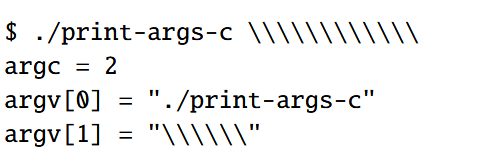
- the one argument is half the # of slashes!