shell 🐚🐚🐚
All code used is on the website (under “code”)
Shell commandddss
Echo
sh
sh-5.2$ echo bazinga
bazinga
spaces seperate “units” so it doesn’t matter how many spaces there are between “units”. It simply prints out all “units” seperated by a single space
echo a     b
a b
but you can use ' ' single quotes to literally print the spaces
- in most cases, single quotes are “stronger” than double quotes - negendran
echo bazinga'        'more bazinga
bazinga        more bazinga
Comments
# Whole Line Comment
ls -l # in-line comment
Variables
var=value
- There are no spaces otherwise it would be like, the command
varwith arguments=andvalue.varis NOT a command!
v=xyz
- This declares a variable v
echo $v
xyz
echo ${v} # also works!
xyz
Now consider this example:
v=zzz
v0=xyz
echo $v0 # This would print xyz
xyz
echo ${v}0 # This prints zzz0
zzz0
Prinitng things that are ambigious!
echo \$v
$v
echo "$v"
xxx
echo '$v $v $v'
$v $v $v
Variables seperated by spaces, when passed as an argument, treats them as two arguments! Pretend we do have a file Sales Receipt.pdf
v='Sales Receipt.pdf'
ls -l $v
# This will throw an error along the lines of
# "Cannot access 'Sales' and Cannot access 'Receipt.pdf'

ls -l "$v"
# This will work, and print the contents of our file
The " " sort of treats everything inside of it (what otherwise would be a stream of characters seperated by spaces) as one big string. You can also add extra stuff to this chonky string, and then pass that!
ls -l "Prefix for the file of $v"math
y=123
echo $((y * 4))
492
Command Substitution
Note that echo returns something, and we can “capture that”. This works with all sorts of commands!
echo Todays date is $(date)
Todays date is Thu 15 May 2025 03:40:25 PM EDT
Shell Scripts
sh will run a file and read it line by line, running le commands.
echo -n xxx
echo -n yyy
echo -n zzz
You can make a proper “executable” with the following steps
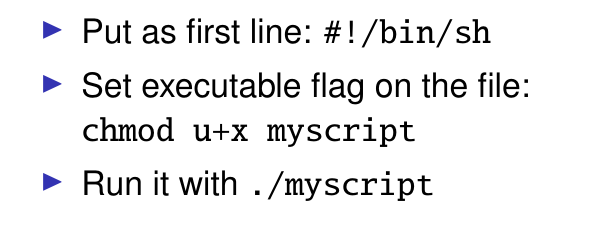
todo Why does ./bazinga throw an error saying “Permission Denied” when just trying to run it (it has a bunch of commands in it!)
- I know it’s not an executable. I want to know why the error is “Permission Denied”
ALSO, why does
bazingathrow the error “command not found” !?!? Why are the errors different (I thought the pointed to the same file (?))
You can do a similar thing with python
This file is foo
#!/usr/bin/python3

print("xxx")
then you can run ./foo ANYWHERE. The language does not matter!

- Thinking of "" as a STRING, what would
foo bar xyzbe? What does it represent? What is its “data type” ??? Or is it really just 3 seperate “strings”
Command line arguments
#!/bin/sh

echo "\$# = $#"
Loops
for i in "$@" ; do
    echo "'$i'"
done
If you run ./foo a 'b c d' e f the above will print
'a'
'b c d'
'e'
'f'
BECAUSE of the " "’s around $@todo WHY
Shift
”shifts positional parameters”
while [ $# -gt 0 ] ; do
	echo "'$1'"
	shift
done
File redirection
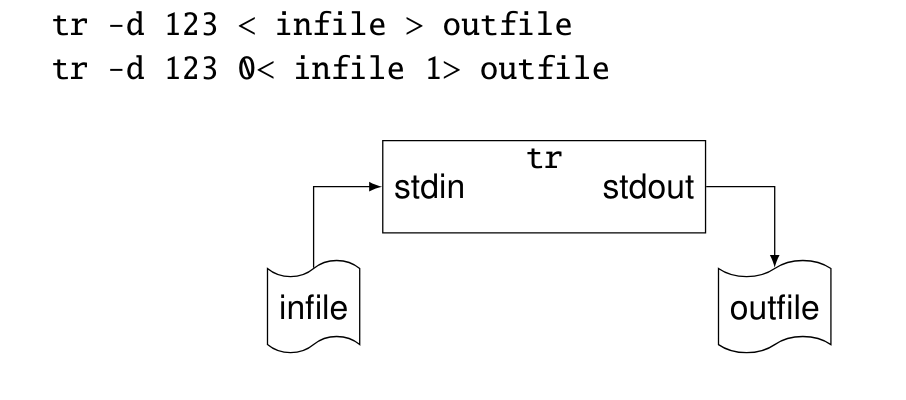
- The 0 represents standard in.
- 1 is for stdout and 2 is for stderr
- In some contexts you can use these numbers to represent the above standard thingys (todo is there a general term for these guys?)
Appending
echo hello > myfile
echo kitty >> myfile
the file will contain
hello
kitty`
[File] Redirection
&1 represents what stdout is already pointing to (?)
command > file 2>&1
- Redirects stdout and stderr to the same file
todo this WHOLE thing b/c i really do not understand it one bit
Sequential Composition
(You can run, on a single line, many commands)
cd b09 ; ls -l ; cd ..
known as a (command) list
If you want to continue a line to two lines, you can use a backslash to look nicer
echo hello B09 \
	students
prints hello B09 students
Exit Code / Success / Failure
$? is a special variable and stores the most recent command’s exit code
- Any non-zero number represents a failure
- This is different from programming / logic where false = 0 since the numbers stand for different kinds of errors.
- False is 0 in logic since and is false!
Pretend you run, a program, then
echo $?
echo $?
The second echo will print 0 since the echo ran successfully !
AND OR NOT true false
Sequential execution
mdkir foo1 && cp myfile foo
- Will run the first command; if the exit code is 0, then it will run the next command!
&&and||have the SAME precedence, which is different from regular logic / programming. aaa. Both of these are lower than!though. phew.
Test commands
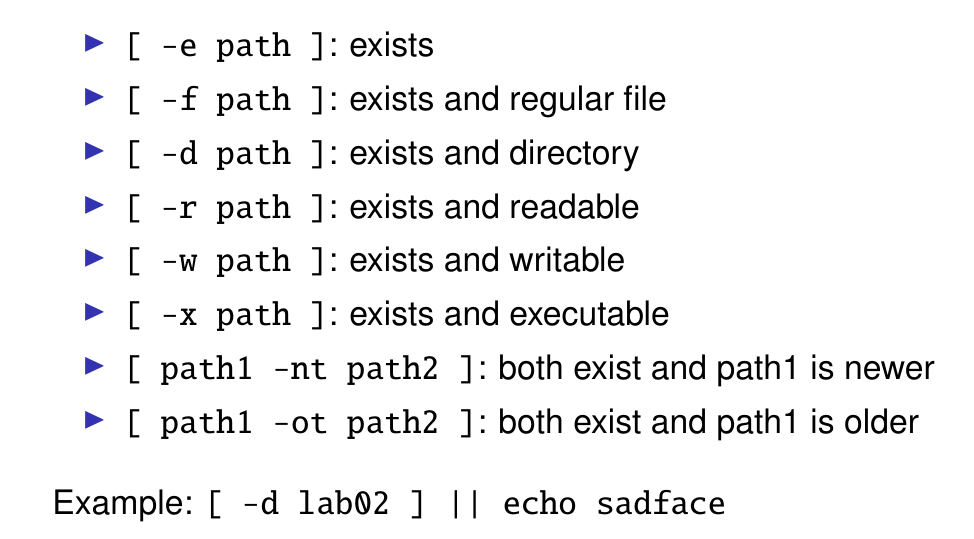
Returns 0 or non-zero. Useful for… things. Like showing if a file exists or not. That kind of thing.
- in the example given,
echo sadfacewill NOT run if[ -d lab02 ]is true, since the||is now sufficient and no more work must be done.- This is EXACTLY like short-circuit evaluation
Something noah suggested:
if [ -n "$verbose" ]; then
	echo "deleting $f"
fi
if [ -z "$dryrum" ]; then
	rm "$f"
fi
The above SHOULD be equivalent to
[ -n "$verbose"] && echo "deleting $f"

[ -z "$dryrum" ] && rm "$f"
You DONT need the semicolons. You can also use a new line but it’s supa ugly
if [-n "$verbose" ] ; then
	echo "deleting $f"
elif
	echo ""
fi
EQUALS (I THINKKKK)
if [-n "$verbose" ]
	then
		echo "deleting $f"
elif
	echo ""
fi
todo confirm plz thanknknaktnawn
SO MANYU THING SABOUT WHILE LOOPS
seq 0 3 returns numbers 0 1 2 3 seperated (so it’s not a string, it’s those “seperated words” i was confused about before)
braindead
echo --help
--help