File Open
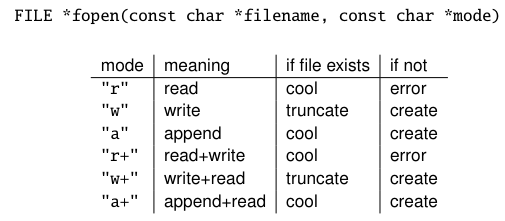
- (truncate means to just erase the original content)
- Remember to check if return NULL
- FILE is a struct with a bunch of stuff most of the time
a+can read and write, and always appends.goes-in-cheat-sheet-2 - If you write, it will push the cursor to the end every time.
- If you read, you’ll have to move the cursor to the start (otherwise the cursor will be at the end!)
#include <stdio.h>
#include <stdlib.h>


int main() {
    FILE * a = fopen("test.txt", "a+");

    fseek(a, 0, SEEK_SET);

    fputs("hmm?!", a); // This automatically sends the cursor to the end, even though we fseek'd'

    fseek(a, 0, SEEK_SET);

    char *buff = (char*) calloc(sizeof(char), 1024);
    fgets(buff, 1024, a);

    printf("%s\n", buff);
}
rb+ is a mode. The b isn’t necessary for unix systems. Windows tho, yes.goes-in-cheat-sheet
- What it does is, in binary, 10, 13, and 26 should stand for themselves (literally what they are). You wouldn’t want them to be “carriage return”, “linefeed”, or anything like that. Windows ends regular files with 26. Creating a binary file, you wouldn’t want that 26 in the way. So yeah, add the
b- the
bgoes after anyr rb,r+b,rb+, etc.
- the
File Close
int fclose(FILE *stream); // Returns 0 if success, EOF if error (that's 01)goes-in-cheat-sheet Close ASAP cuz stream limits per process, writing might be delayed (buffered until closingtodo ?) and on windows there are restrictions too.
Formatted I/O
int fprintf(FILE *stream, const char *format, ..args...); // Return # of chars printed
int fscanf(FILE *stream, const char *format, ..args...); // Return # of args read

// Cool fact!
printf(format, args) = fprintf(stdout, format, args); // (stdout, stdin, etc. are pre-opened)
// Same with scanf. That's fricking sick
Out single char
int putchar(int c) // Prints to stdout
int putc(int c, FILE *stream) // prints to file
// Returns char printed or EOF if error. EOF = int, so we store result as int, then downcast to char
String I/O
int fputs(const char *string, FILE *stream);
// Returns EOF if error. `fputs` doesn't add \n. `puts` does.
char *fgets(char *dest, int n, FILE *stream);
// n - 1 chars are read at max (unless newline is hit -- which is included!) n is for the array size of dest. the nth char is for the null terminator
Arbitrary I/O
size_t fread(void *dest, size_t s, size_t n, FILE *stream);
// Reads stream. Outputs "n" items of size "s" to buffer "dest"
size_t fwrite(const void *data, size_t s, size_t n, FILE *stream);
// Writes "data" which is "n" items of size "s" into stream
// Useful for arrays, structs, and raw bytes (arrays of unsigned chars)

// Returns number of items read / written
Seeking
int fseek(FILE *stream, long i, int origin);
// Origin can be SEEK_SET, SEEK_END, or SEEK_CUR. SEEK_CUR is useful when using "i" for the offset (-10 or 24 bytes away)
// Returns 0 on success. -1 of error
long ftell(FILE *stream); // Returns current cursor pos
Detecting End-of-Stream (vs. Error)
int feof(FILE *stream);
// Returns true if end-of-stream. Read from the file before calling this.
int ferror(FILE *stream); // Checks if error. lol
void clearerr(FILE *stream); // makes error/end-of-stream status go byebye
// The above are "getters" for the "end" and "fault" bool fields of a FILE:
	// clearerr() and rewind() set "end" and "fault" to false
	// fseek() resets "end" to false
	// if read and end of file, "end" is true
	// if error, "fault" is true

void perror(const char *preix); // prints error message for current errno
Buffering
When writing, everything u write gets accumulated, then written to the kernel. When reading, the whole file is put into the buffer. This reduces overhead. int fflush(FILE *stream) will flush output now. EOF if error. 0 if success.
(gonna ignore the setvbuf stuff. maybetodo slide 16) There’s full buffering, line buffering, or no buffering (write immediately) stdout is line-buffered. stdin is complicated. stderr has no buffering though.