Sockets!!!! Inter-process communication!!!
- One side is the server (has a publishable “address”)
- Other side is “client”, contacts server via published address
- Means any process (even ones on other devices) can make contact. This is unlike pipes, whose processes must come from the same fork tree
- Whereas with a pipe you can only write in 1 end and read in the other (1-way street), file descriptors are a two-way street in that you can read and write into it.
- Sockets… are freaking files. “Everything is a file” in UNIX actually goes crazy.
”Axis 1”: There are 3 scopes (“domain”, “address family”)
- Unix Domain
- Local to computer. Address is a filename
- IPv4: Over network (but has a “loopback” address for local connection).
- Has a 32-bit address and a 16-bit port numbertodo i swear the port number went from 0-10000 (is it more than that?)
- IPv6 is like IPv4 but with a 128-bit address
”Axis 2”: There is a lower level datagram and a higher level stream
- The datagram goes by packets (“chunks”). One write syscall is 1 chunk, which is one read syscall
- Packet loss is possible. Neither side is notified if it does happen, though 😨
- They can even be out of order!!!
- As for the stream, the a network stack confirms, times out, resends, and restores data. You just use it as a “byte stream”
- The network stack can re-chunk for efficiency, so the receiver may not see the sender’s OG chunking.
Stream Socket: Client Workflow
- Call `socket
- ”Create a socket
fd”
- ”Create a socket
- Fill in address struct
- Call
connectand usefdto connect to server as the address (files = address)
- Call
- Use
fdto talk to server - Close
fdwhen done with client
Stream Socket: Server Workflow
More complex because many fds will be juggled!
- We have 1 FD per client (
cfd) and 1 FD to wait for new clientssfd
- Call
socketand create socketsfd - Fill in address struct. Call
bindforsfdto said address - Call
listen(which doesn’t actually listen but really “declares”sfdis waiting for the clients to connect)- This means the file will be readable when clients do connect. Unlike calling
connectwhere writing into the file sends “real data”
- This means the file will be readable when clients do connect. Unlike calling
- In a loop, we:
- Call
accept(sfd)which is what “actually” blocks / waits for a client to connect. You should then get another socketcfd - Use this
cfdto talk to the client and close it when done
- Call
- Close
sfdif we’re no longer waiting for new clients
Now let us get specific!
Socket Creation
int socket(int family, int type, int protocol);
- returns a positive socket FD, or -1 for error
- Family is either
AF_UNIX,AF_INET(IPv4), orAF_INET6(IPv6) - The type is either
SOCK_DGRAM,SOCK_STREAM, or other advanced low-level types - Protocol is
0(other values are for advanced shenanigans)
Connection
int connect (
	int fd,
	const struct sockaddr *server_addr ,
	socklen_t addrlen
);- ”Real address struct is never
sockaddr”- Unix domain, it’s
sockaddr_un - IPv4 domain:
sockaddr_in - IPv6 domain:
sockaddr_in6
- Unix domain, it’s
- You will always have to cast pointer type and provide size:
connect (
	myFd,
	(struct sockaddr*) &myaddr, // myaddr is of type sockaddr_in for example.
	sizeof(struct sockaddr_in)
);- When dealing w/ that address struct, it’s best to use
memset(i.e. you set the memory to 0) before filling in fields (because of padding/reserved bytes) - If successful, you can use
read,write,closeon thefd- Also
recv,send,shutdownfor socket-specific featurestodo
- Also
IP (IPv4) addresses
- They are 32 bit / 4 byte numbers. It helps identify computers (more accurately, identifies network interfaces)
- Uses dot-notation as string. Each byte is in decimal, separated by dots
192.168.0.1becomes11000000 10101000 00000000 00000001- Mathlab:
142.1.96.164 - uoft.me:
104.236.216.17 - loopback address:
127.0.0.1
- Mathlab:
You can use
digto look up IP addresses from domain names.
- Many domain names can map to 1 IP address
youtube.comandyoutu.becould be an example
- 1 domain name can map to many IP addresses
- To offload stress, 1 domain can go to many servers w/ different IPs
The IPv4 Address + Port struct
struct sockaddr_in {
	sa_family_t sin_family ; // AF_INET
	in_port_t sin_port ; // port
	struct in_addr sin_addr ; // IPv4 address
};

struct in_addr {
	uint32_t s_addr;
};
Port and IPv4 address need to be in “network byte order”
Two special addresses
htonl(INADDR_LOOPBACK)
- This is your loopback, 127.0.0.
INADDR_ANYis just0.0.0.0. Means “any”. Requests binding to all network interfacestodo again idk what that looks like
Little and Big Endian
- If big endian, the end is big
- E.g. for a 16-bit number 772, the hex is
0304. That is2bytes! - The order of these
bytes(not bits) depends on the network byte order- So you could have
0304with little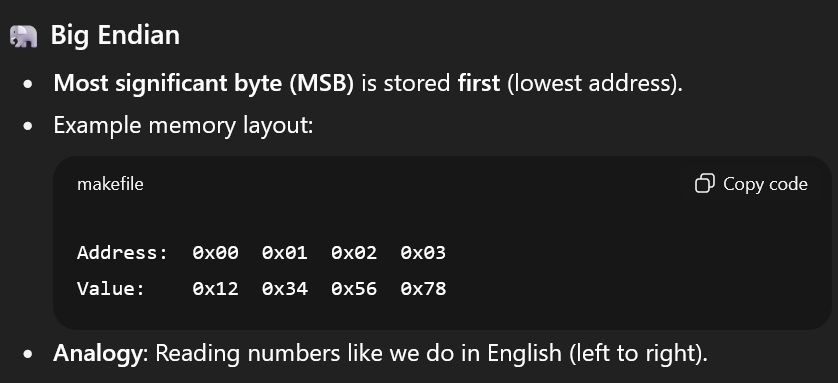
- So you could have
- Addresses are from left to right. Interesting!
- Intel does little endian (
0403would be the equivalent number)
There are functions htonl (32-bit) and htons (16-bit) that turns machine (host) order into network order
- Network order is always big-endian, but machine / host order could be little/bit endian.
- The other direction:
ntohl,ntohs. - The system unfortunately doesn’t auto-convert for us 😔
inet_pton,inet_ntoplets you go from dot-notation string and 32-bit network byte order p= “presentation” / “dot-notation”.n= network (binary)inet_pton= “Internet presentation to network”inet_ntop= “internet network to presentation”
bind
int bind(
	int fd,
	const struct sockaddr *addr,
	socklen_t addrlen
);
Exactly like connections
- You gotta use either
sockaddr_inorsockaddr_in6and cast for the*addrarg - Use
memsetwhen creating address structs.
Listen and Accept
int listen(int fd , int backlog);
- backlog = max queue length in network stack
- This backlog grows when you call
connectbut don’t callaccept
int accept(
	int fd,
	struct sockaddr *client_addr,
	socklen_t * addrlen
);- If success, returns new socket
cfdfor talking to client. client_addrreceives client address (remember tho, it depends on address family. it’s not really of typesockaddr)- Means
client_addri think is returned, not passed
- Means
Stream Socket: No packet boundary
If the sender goes
write(fd , n1 , chunk1 );
write(fd , n2 , chunk2 );
and the reader goes
r = read(fd , myspace , n);where Then there are 4 splitting/merging possibilities:
- Only first part of chunk1 is read ()
- Only all of chunk1 is read
- Chunk1 + first part of chunk2 is read
- All of chunk1 + chunk2 is read
If working locally, then it’s usually the second case. But if non-local, then it could be any of those other options. As such, you should call
readagain to get more stuff
Broken Pipe
When you write to pipe/socket but the other end has closed, you have a broken pipe
Your process gets SIGPIPE, which by default KOs your program.
Instead, set action to SIG_IGN so it doesn’t get murdered. Write will just return -1. Yay