File system stuff!
Each file has 1 owning user and 1 owning group (default is the creator + their default group)
Flags: Owner, group, and others r,w,x perms. 9 in total
Notation is rwxr-x---. User (owner) may do all, group may read. Others do nothing
You can try executing regular files like
./image.pngbut if there’s no#!shebang u prolly will get an error. Would get perm fault if no execute perms, tho.
Example perms:
emails, browser data (sensitive): rw-------
hw for b09 profs and TAs to mark: rw-r----- w/ group as cscb09s25i
java code for team project: rw-rw----
jokes for everyone yay rw-r--r--
File “read” perms = copy perms, too For dirs:
- Read perm = see filenames.
- Write perms: You can add / delete files
- Execute: You can
cdinto the directory and use pathnames to go thru the directory.
To change perms u use chmod and specify: u=rw means user reads and writes. g=r means group can read. Several notations tho
chmod(const char *path, mode_t mode) also is a thing
To change owning user or group you do any of these:
chown user path1 ... # Sets owner of "path" to be "user"
chown user:group path1 ... # Sets owner and group owner of files
chown :group path1 ... # Just change group owner. User owner stays
chgrp group path1 ... # Same as above
i-node
File system has an array of i-nodes called i-node table. Fixed in disk
i-node number = array index
Each file/dir is identified by an i-node, not by filename (filenames are in dirs)
i-node also stores file/directories metadata:
- type, perms, owning user and owning group, size, timestamps, where the data is on disk, others. NOT file name!
statgives the i-node info!
A directory simply stores mappings from filenames to i-node numbers
- Different data on different systems. Regardless though
opendir,readdir, andclosdirlets you access “portably” in Albert’s wordsgoes-in-cheat-sheet-2 - Two filenames with same i-node means two
direntries to the exact same file
Hard Link
ln file pathcreates another filename to have the samei-nodenumber as an existing file. This creates a “hard link” (edit one, the other changes!)- System call version of
lnislink(idk the difference though) .and..are implemented hard links!- Otherwise hard-linking directories is disallowed (besides
.and..)
- Otherwise hard-linking directories is disallowed (besides
Unlinking = Deleting a file
- Decreases reference count (stored in the
i-node) - If there’s no more refs, then file is freed from disk space (as well as the
i-node)- If some processes still have it open, we wait for closing
- Soft links (Symlinks)
- A file that forwards u to another pathname.
- Most systems follow “symlink forwarding” (symlink to symlink to symlink, keeps being followed until OG file is found). C code does this too.
symlinkandln -screate symlinks
- If the path is relative, it’s relative to the directory that
linknamelives intodo I don’t think he can english symlinks break on name change. Hard links don’t..- symlinks will still work if the file of a certain name is deleted and a new one is created with the same name. hard links would still point the file you deleted
File Attributes
- These are the system calls to get file attributes (a.k.a. “statuses”)
int stat(const char *path, struct stat *statBuf)int lstat(const char *path, struct stat *statBuf)- Both of which return 0 if success and -1 if error (also sets
errnoforperror()) - for
stat, if you pass a path to a symlink, then it gives info on the file it points to. However, forlstatit gives info on the symlink itself
The field
st_modehas file type and permission flags, e.g., it representsdrwxr-xr-x. Meaning and useful macros inman inode
Bit stuff
26 is twenty six: . The base is ten. Wow. intuitive
Hexadecimal means the base is 16 instead.
Bitwise operations
Bitwise & and, | or, ~ not, and ^ xor
Example:
a = 10001001andb = 00000011
a & b = 00000001a | b = 10001011~ a = 01110110a ^ b = 10001010
Left shift << and right shift >>
00011000 << 2 = 0110000000011000 >> 2 = 00000110- This is
Check/set/clear/flip
Here’s how you check/set/clear/flip bit 5 of b where b = 00000011
Let there be an m = 00100000 = 1 << 5. Bit 5 is on; rest are off. You can:
- Check if bit 5 is set with
if (b & m) - b = b | m (set bit 5 to be
1) - b = b & ~m (set bit 5 to 0)
b = b ^ m(flip. )- You can also do
b |= morb ^= netc. etc.
- You can also do
File Perms (bitwise layout)
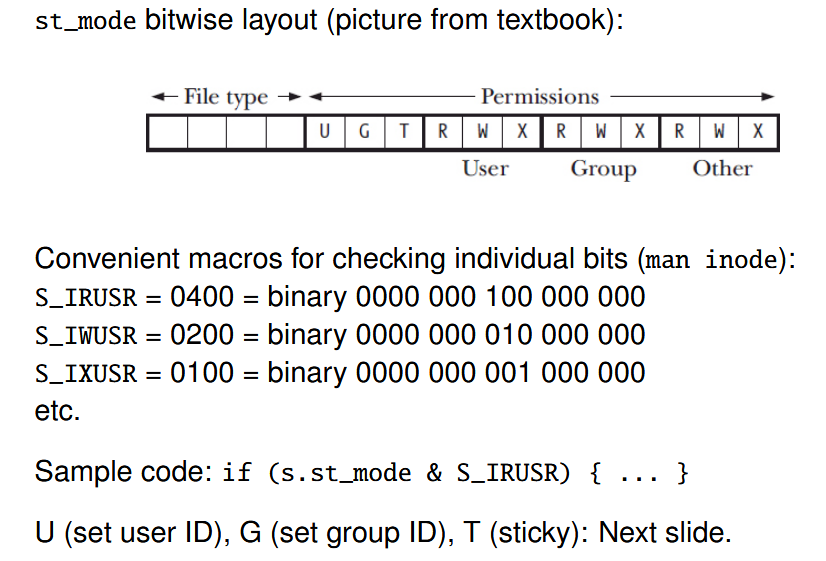
- For dirs:
set-gid= inherit group of parent dir. (w/o bit it’s creator’s group).sticky: When on, other users can’t delete/rename files./tmpis writable by all, but cannot delete/rename temp files. So it has sticky bit
- For exe:
set-uid= run w/ owners privilege. E.g.sudoruns with this bit so that it has elevated privileges! Think of it as “run as admin” on Windowsset-gid= same as about, but group instead of owner
int open(const char *path, int flags);
- Flags could be
O_WRONLY, O_RDONLY, O_RDWR, etc. If success, return “file descriptor” (fd). int open(const char *path, int flags, int mode);If flags hasO_CREAT, mode is initial permsssize_t read(int fd, void *buf, size_t count);andssize_t write(int fd, void *buf, size_t count);off_t lseek(int fd, off_t offset, int origin)- origin is
SEEK_SET, SEEK_CUR, SEEK_END. Returns new offset if success
- origin is
int close(int fd);
umask limits initial perms at file creation. On bits = bans. Actual perms = what open asks for & ~ umask
e.g. umask 077 to block rwx for group and others.
FILE *fdopen(int fd, const char *mode); (mode is r, w, etc.)
File Descriptor
- Every process has a file descriptor table. They are array indexes.
- Since process creation, 0 = stdin, 1 = stdout, and 2 = stderr by default.
openanddupcreates entries;closefrees entries - Finite space! Will run out.
- Open File Table = System wide. Contains cursor/file position. Each OFT entry has inode ptr. Many files can be opened to the same file/inode ptr.
- Two fd’s can point to the same ODT entry via
dup()ordup2()int dup(int oldfd);. Returns new fd to refer to same OFT entryint dup2(int oldfd, int newfd);- like
dup()but the entry is atnewfdinstead. Ifnewfdis in use, close first!dup2(20,1)would dup 20 to 1. #goes-in-cheat-sheet-2 Include the slide 23 image. It’s good
- like
dup(1, 2) = command 2>&1 since fd 2 is closed, then fd 2 is set to fd 1. That means whatever fd 2’s changes are is reflected into fd 1 (stdout)