File system stuff!
execute doesn’t just mean “run-able”. It also means being able to cd into (if it’s a directory) and allow use of pathnames going through the directory
To change perms u use chmod and specify: u=rw means user reads and writes. g=r means group can read
- But there are several notations
chmod(const char *path, mode_t mode)also is a thing
To change owning user or group you do any of these:

i-node
File system has an array of i-nodes
i-node number = array index
Each file/dir is identified by an i-node, not by filename
i-node also stores file/directories metadata:
- type
- perms
- owning user and owning group
- size
- timestamps
- where the data is on disk
- others
- but not filename!
statgives the i-node info!
A directory simply stores mappings from filenames to i-node numbers
- Different data on different systems. Regardless though
opendir,readdir, andclosdirlets you access “portably” in Albert’s words important
Hard Link
lncommand creates another filename to have the samei-nodenumber as an existing file. This creates a “hard link”- System call version of
lnislink(idk the difference though) .and..are implemented hard links!- Otherwise hard-linking directories is disallowed (besides the two exceptions above)
Unlinking = Deleting a file
- Keeps removing references (these are stored in the
i-node) - If there’s no more, then it actually frees the file from disk space (as well as the
i-node)- If some processes still have it open, we wait for closing
- Soft links (Symlinks)
- Forwards you to another pathname.
- Most systems follows “symlink forwarding” todo
symlinkandlncreate symlinks
- If the path is relative, it’s relative to the directory that
linknamelives intodo I don’t think he can english symlinks break on name change. Hard links don’t..- symlinks will still work if the file of a certain name is deleted and a new one is created with the same name. hard links would still point the file you deleted
File Attributes
- These are the system calls to get file attributes (a.k.a. “statuses”)
int stat(const char *path, struct stat statBuf)int lstat(const char *path, struct stat statBuf)- Both of which return 0 if success and -1 if error (also sets
errnobut idk what that istodo) - for
stat, if you pass a path to a symlink, then it gives info on the file it points to. However, forlstatit gives info on the symlink itself
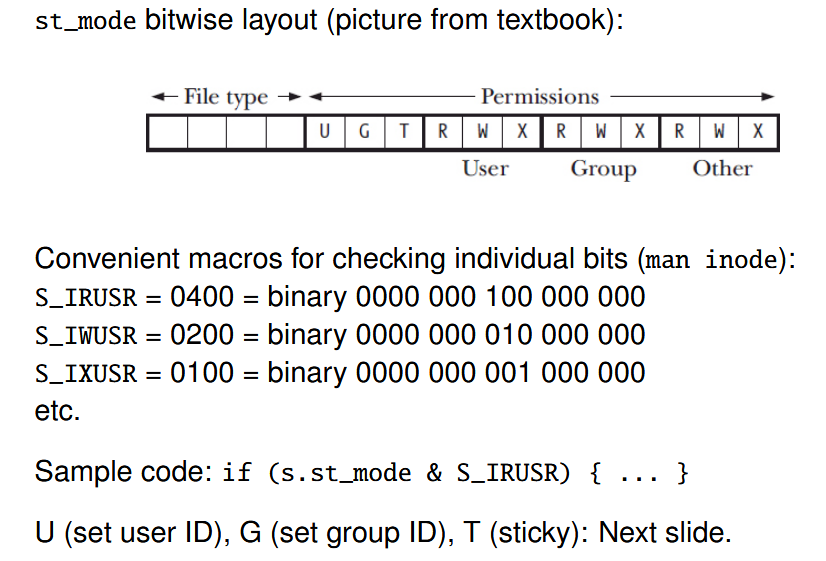
The field st_mode has file type and permission flags, e.g., it represents “drwxr-xr-x”. Meaning and useful macros in ‘man inode’
- Try to understand thistodo but from what I get of it:
st_modeis some field mentioned inman 3 stat(statbeing a struct)
Bit stuff
Base then stuff:
26 is twenty six:
The base is ten. Wow. intuitive
Hexadecimal means the base is 16 instead.
Bitwise operations
Bitwise & and, | or, ~ not, and ^ xor
Example:
a = 10001001andb = 00000011
a & b = 00000001a | b = 10001011~ a = 01110110a ^ b = 10001010
Check/set/clear/flip
Here’s how you check/set/clear/flip bit 5 of b where b = 00000011
Let there be an m = 00100000.
Note that m = 00100000 since that’s the 5th bit! Bit 5 is on; the others are off.
- Check if bit 5 is set with
if (b & m) - Then we do the algorithm:
- b = b | m (set bit 5 to be on)
- b = b & ~m (set bit 5 to 0)
- I don’t get the point of setting 1 and removing 1…todo
b = b ^ m(flip. )
- You can also do
b |= morb ^= netc. etc.
File Perms (bitwise layout)