What be a shell script
- It’s a file with commands
- Its run on the shell
- The shell is both a CLI and a scripting language interpreter
chmod
- 755 = scripts anyone can run
- 700 = scripts only the owner can run
chmod 755 hello_worldmakes our script executable. - Alternatively you can do
chmod u+x myscript
Now we can run ./hello_world so long as we’re in the directory it was created.
To make it runnable anywhere, move it to one of the registered directories in the PATH
PATH: A set of directories where executable programs are located You can list the PATH with
echo $PATH
Actually writing
Shell scripts have
- The shebang
- That’s the comment at the top that points to the interpreter for the file.
#! /bin/shexecutes the file using the shell
Declare constants with declare -r COSTANT=VALUE
- The
-rflag indicates read-only
Here Documents
- Lets you pass (“embed” as the text says) multi-line strings into a the standard input of a command like
cat
The
standard inputof a command is the stream of data a command reads by default Commands likecat,grep, orsorttry to read from stdin
We use
<<since<is the input direction that takes a file. If we didcat < _EOF_it would search for the file and give us problems. The syntax<<is specifically for here documents.
cat << _EOF_
<html>
	<head>
		<title>$TITLE</title>
	</head>
	<body>
		<h1>$TITLE</h1>
		<p>$TIMESTAMP</p>
	</body>
</html>
_EOF_-
Remember how everything is a file. Well, so are inputs (literally: stdin is a file).
-
_EOF_is a special string to mark the end of an embedded text. -
⚠️ Important difference
- In here documents, single quotes
''and double quotes""lose their meaning.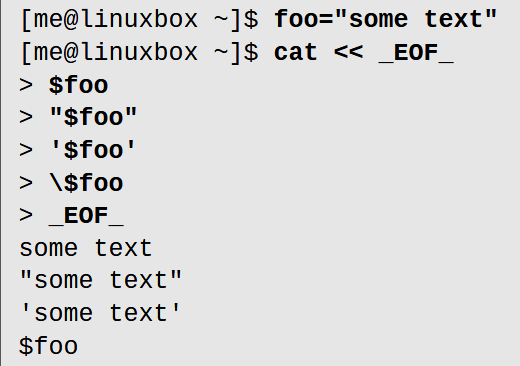
- In here documents, single quotes
-
⚠️ Another cringe difference (i mean its useful but still, weird syntax): if you surround the term representing your end of file with single quotes like
'_EOF_', then absolute no expansions will be performed on the text.- Start with
'_EOF_'and end with_EOF_(no quotes)
- Start with
cat << '_EOF_'
> Here are the outputs:
> $foo
> "$foo"
> '$foo'
> \$foo
> _EOF_
Here are the outputs:
$foo
"$foo"
'$foo'
\$foo
""
You can do <<- instead to ignore leading tabs so the here document can be indented.
26: Top-down design
- Having large, general steps and breaking them down into smaller, more digestible steps.
Each of these steps can be done in one “function” and all we’d have to do is string the functions to get a cohesive program.
functions!!!
Written with either of the two syntaxes below:
function name
{
	commands
	return
}

# OOrrr

name () {
	commands
	return
}
You invoke it like this:
name
that’s it. It’s like a command!
Local variables
function1 () {
	local foo # Defines a local variable
	foo=1 # Setting it to something else
	echo "function1's 'foo' is $foo"
}- These do NOT create subshells
Group commands
function()
{
	command1
	command2
	command3
	return
}
function > output.txt
# Equivalent to
{ command1 ; command2 ; command3 ; } > output.txt
27. Flow
if [ "$x" -eq 5 ]; then
	echo "x equals 5."
else
	echo "x does not equal 5."
fi
We need the
""’s around the variable in the scenario where$xis empty b/c then your substitution will look like[ -eq 5 ]which will throw an error but it’ll make no sense! #todo Try it. Also try it inside of debian cuz for abinash it gave an error w/o the "" quotes but i swear it should work anyway…
[: -eq: unary operator expectedhappens when the var is empty. Pleasetodo when I can use my laptop!!
There are two commands true and false that literally just terminate and return an exit code of 0 or 1 respectively.
true
echo $?
0 # output

false
echo $?
1 #output
Tests
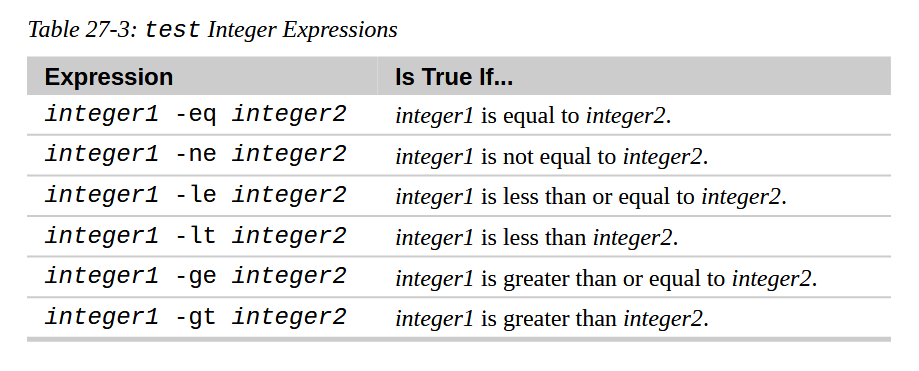
You can either call the test command like test expression or [ expression ] where [ is the start of the command (that’s wack)
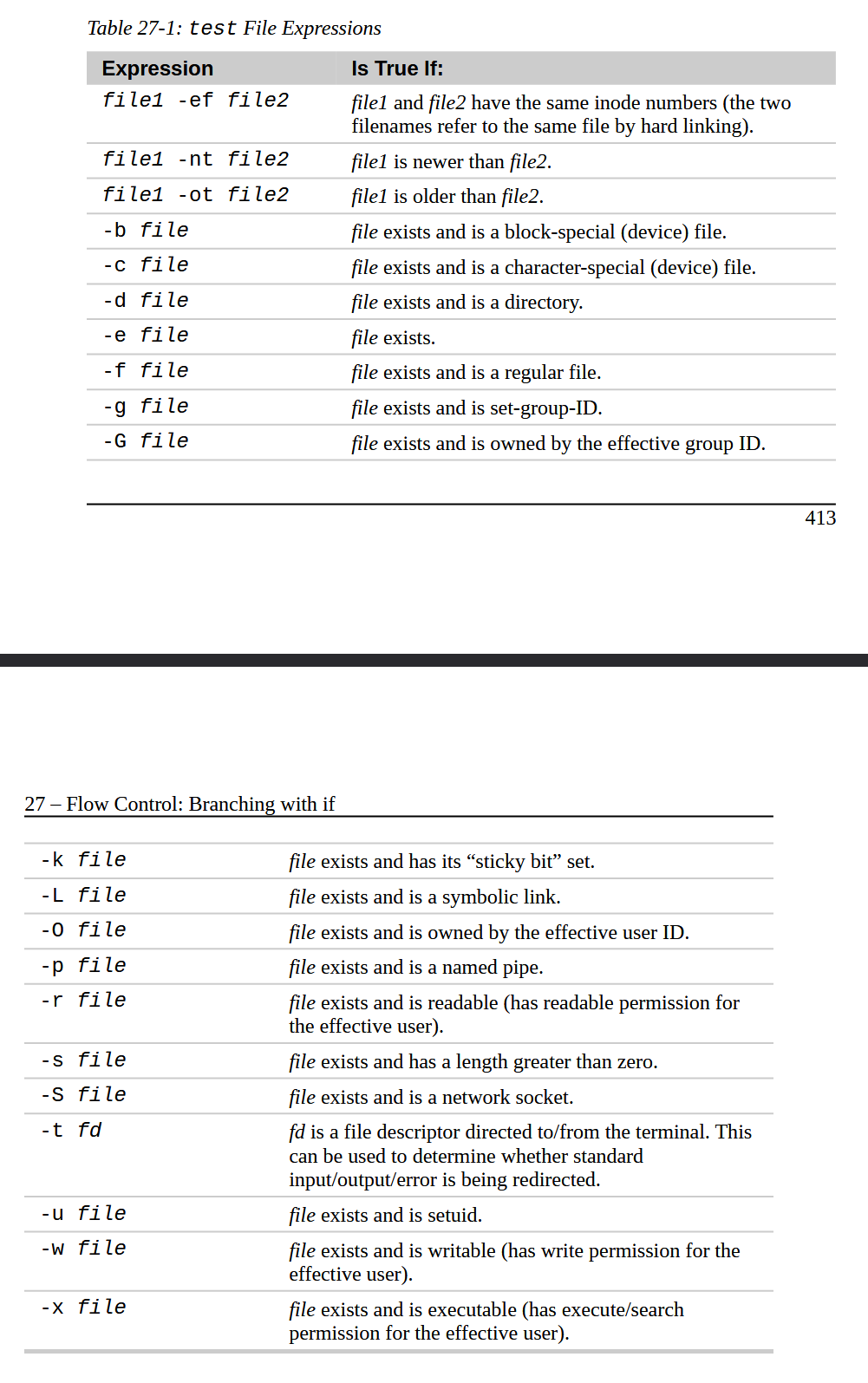
We already saw [ number -eq number ] from above but there are a bunch of file-related ones which we can’t possibly all remember but they do exist!
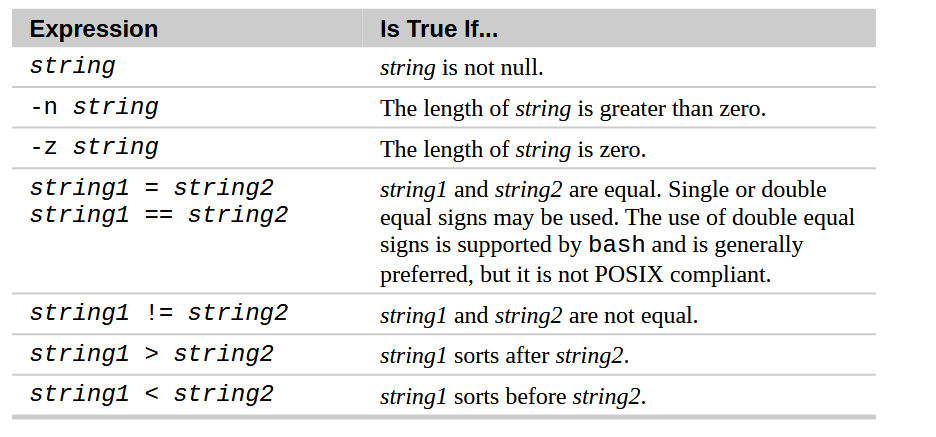
There are also string comparisons
Okay so (()) is your arithmetic truth test; a command but its only quirk is that ((0)) returns the exit code 1 and ((1)) returns the exit code 0.
You can do all sorts of things inside of the (())’s
number=10((number < 1))// Comparison((number > 30))// Comparison((number - 10))// Evaluates (note the exit code would be1)((number == 10))// Another… comparison You can do%,*, and other operations.
NOT to be mistaken by arithmetic substitution $((...)) which actually “returns” what is output.
Negation !
if ! [ 5 -eq 3] ; then
	echo "Yeah, true that!"
fi
28. keyboard input
read takes in a variable name and you can do whatever epic things with it!
29 while loops n breaks n continue things
todo Idk if we need to know select but it’s a thing\
until is like while except it does the thing until the the condition is true
count=1
until [[ "$count" -gt 5 ]]; do
	echo "$count"
	count=$((count + 1))
done
todo to do later
30. troubleshooting. just the same old stuff i alr know
31. Cases
case WORD in
	pattern) commands
			 moreCommands
			 ;;
	otherPattern) ... # etc etc
	#etc etc etc
esac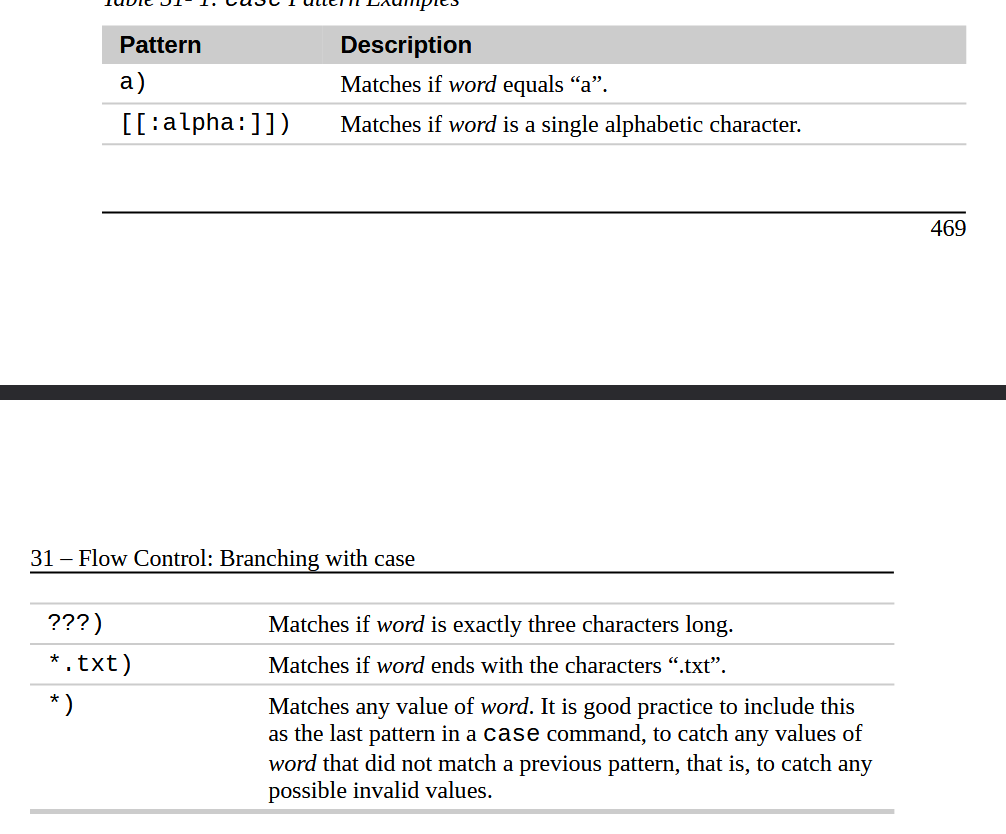
Positional Parameters
You can get as many parameters as you want with ${999} for the 999th argument
- The
$0is the directory of the script itself?
Shift
$2 becomes $1 and $1 becomes $1
⚠️ Pretend you have three arguments, 2, and *=”2 @=”2” “$3”`
- All the arguments are separate strings
VERY IMPORTANT! ⚠️⚠️
Okay no like seriously this time. This is the real deal
print_params () {
	echo "\$1 = $1"
	echo "\$2 = $2"
	echo "\$3 = $3"
	echo "\$4 = $4"
}
pass_params () {
	echo -e "\n" '$* :'; print_params $*/
	echo -e "\n" '"$*" :'; print_params "$*"
	echo -e "\n" '$@ :'; print_params $@
	echo -e "\n" '"$@" :'; print_params "$@"
}
pass_params "word" "words with spaces"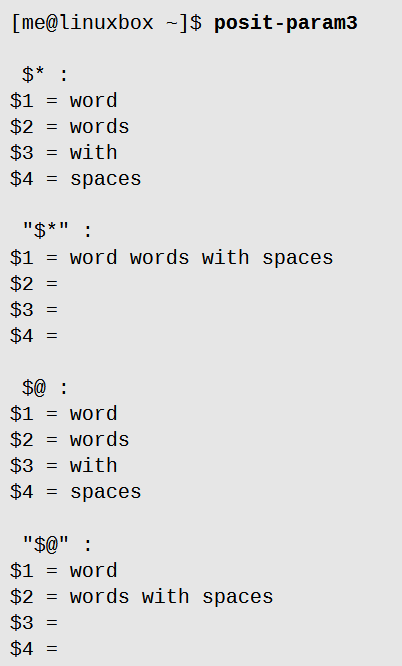
getopts
- if an option name is followed by a
:colon, then that option requires an argument!
Otherwise refer to our previous notes from lecture 3
33. For looops
Light stuff
34.
You access (positional) parameters with ${number}
Substitute if empty
var= # Declares the parameter but it’s not set to anything
${var:-'thing to replace if var is unset'}
Replace - with a bunch of other things to get other kinds of results
String Things
Length ${#varName}
- The # does that
Substrings
${foo:5:6}
- Start at char 5, go up 6 characters n return that
- You can start negative to go to the end of the string and index backwards (python style)
Then we went over $(()) oh also exponential is done with ** yippee
Oh also look u can do echo $((foo += 2)) and that will increase foo!
Also inside of (()) you can do your boolean operators like <=, ||, and ==
Arrays
a[1]=foo
# means a is an array; the second item is "foo"

#You can also declare arrays with -a
declare -a a
Also you can do this: `days=(Sun Mon Tue Wed Thu Fri Sat)
arr[*] gets everything
arr[@] gets everything surrounded by " "
36.1 Group Commands & Subshells
You run several commands and the output is grouped together like
{ echo hello ; echo world ; echo ! } is basically:
hello
world
!
and also () does the same but runs in a separate shell mhmhm.
Noticeable in scenarios like this:
echo "foo" | read
echo $REPLY- Since
readcreates a variable REPLY