For addiu there is a type. we do zero extension, not sign extension (sign why? the number is unsigned!)
Bitwise logical operations
- For each 32 bits of
$sand$twe AND them.
sll ⇒ shift left logical (for an immediate)
sllv ⇒ shift left logical (for a variable v)
sra ⇒ shift right arithmetic
#todo it’s in the slides oops
- ”immediate values are encoded in the instruction set”
For non-linear code break things up to make it less complicated / high level
To “goto” another bit of code, we jump or branch
- Branching happens based on some condition (like an if statement!)
beq⇒ Branch if equalbgtz⇒ Branch if greater than zeroblez⇒ Branch if less than or equal to zerobne⇒ Branch if not equal These all take two things to compare, and alabelwhich updatespc(the instruction we are executing)
Comments are really important.
Labels look like main: or end: and the like. Labels are word that describe the location of the first instruction of a new “block”todo How do we know where they end though? (Okay we don’t lol. It will keep going and execute the code in the future labels :p It’s really not smart at all! Use j END or something like that as the last line of a branch to make sure it doesn’t continue running the wrong code 👍)
- When we “branch”, we say a “branch has been taken”
- Otherwise we say the “branch was not taken”.
PC += 4like normal Branching is limited! Cuz you have those two compare registers as well as an immediate for the label value - Remember that immediate is the offset from where we are and where we want to go.
- This is good but it still is a constraint with how far we can go (we only have
16bits of “distance” we can use in total)jfor jump goes to another label without any condition
- This is good but it still is a constraint with how far we can go (we only have
There are algorithms for branching && and ||
- todo You can go through the slides but they are very intuitive!
Jumping
j = jump always
jal = jump and link
- It jumps, but before that u store the current location and store in RA
jalrjump and link from registerjalrandjrare R-Type cuz they involve reading from a register. - Can you branch from registers too or nah!? (Ans: Yes with pseudo-instructions)
Comparison instructions
slt compares s and t and sets d if it is less than it (writes just 1 if true) otherwise it stores 0
- Basically it stores a boolean!
Then the other 3 are obvious derivatives:
sltu,slti, andsltiu
And from those you have a bazillion pseudo-instructions for branching using the above.
Loops!
- For loops there are no new thingys. The gimmic is using labels for the things done each loop (
UPDATE) and the things to keep the loop going (START) - While loops are simpler in that they don’t need the
STARTbranch if i understand correctly.
OS Services
- System calls are what the processor does to communicate with the operating system
- For Input, output, files, getting time, and ending program. Y’know, kernel things!
v0is the number of the servicea0-a3are for the args of the service- Then you just call
syscallto run the service of typev0 - The results go to
a0(waittodo is that a typo? That isn’t a return type at all!)
Memory operations
Always either load or store. Storing = storing into registers (because of the load-store design)
These operations have 3 parts for the name:
lfor load andsfor storebfor byte,hfor half-world, andwfor wordufor unsigned (or blank for signed) (changes if we zero extend or sign extend)- in
i($s),$sis a value from a register.iis an immediate $tis the destination register. It’s the data we are either reading or storing depending on the operation- todo i am not getting this very well
Yeah i am quite lost
Example time
lh $t0, 12($s0)
- Address is
s0+12. It’s signed so we sign extends0 + 12and that goes intot0 sbtakes the lowest byte intot0. The address starts froms0 + 12- The offset thing is useful for dealing with structs / stacks / arrays!
- So that offset can be for, say, indexing!
”A view of memory”
- Words must be on addresses divisible by 4. It must be “aligned”!
- Misaligned memory access results in errors (exceptions)
- Words are word-aligned (divisible by 4)`
- Half-words are divisible by 2 (even addresses)
- MIPS
- Word lines have 32 bits which 4 different addresses. When reading or writing, we read all 32 bits at once usually.
- If we want to load a word starting at position 10, then we would need 16 bits from one word, and 16 other bits from another word. That would be wack!
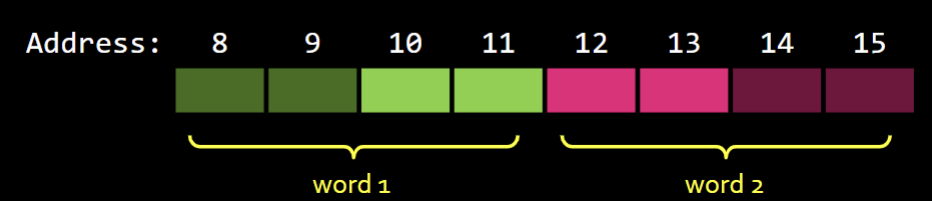
- Some assemblers might know what’s up and only read the correct halves of the words, but truth is it’s not always like that
Variables
- We have a label for the variable name (i.e.
var1:is a label, also a variable name) - Depending on the size, you use
.word,.byte,.half, and.space. These are assembly derivatives .spaceallocates 40 consecutive bytes but they are empty- That all goes into
.data(vs..text) .dataindicates the start of the “data” section where we got our variables.textis for your instructions
la , move, and li
la⇒ Load address of alabelinto$tmovemoves thingy from$sto$tlimoves a 32-bit immediate into$t- It does this by loading the top and bottom halves separately (remember i-type instructions cannot support 32-bit inputs.)
todo GO to the A*B+C example… why can be only move from lo? Will the result retain it’s value… OH WAIT IT DOES
Endianess (WHAT KINDA WORD IS THIS)
Two words in hex = 1 byte.
Endianness determines the order of the bytes (different processors word differently)
Big Endian (big end first)
- The most significant byte is first. in
0x1234ABCD,12has the biggest value.CDis the lowestLittle Endian(little end first) - Opposite. It’s obvious!
CDwould have the biggest value instead.
This is mentioned in lecture because they cause headaches
I caNNOT STOP LAUGHING